Prompt Frameworks Compared: Which One Should You Use? (COSTAR vs RISEN vs RTF vs CARE)
Compare the top prompt engineering frameworks: COSTAR, RISEN, RTF, CARE, and TAG. Learn when to use each framework, see side-by-side comparisons, and discover which framework works best for your specific use case.
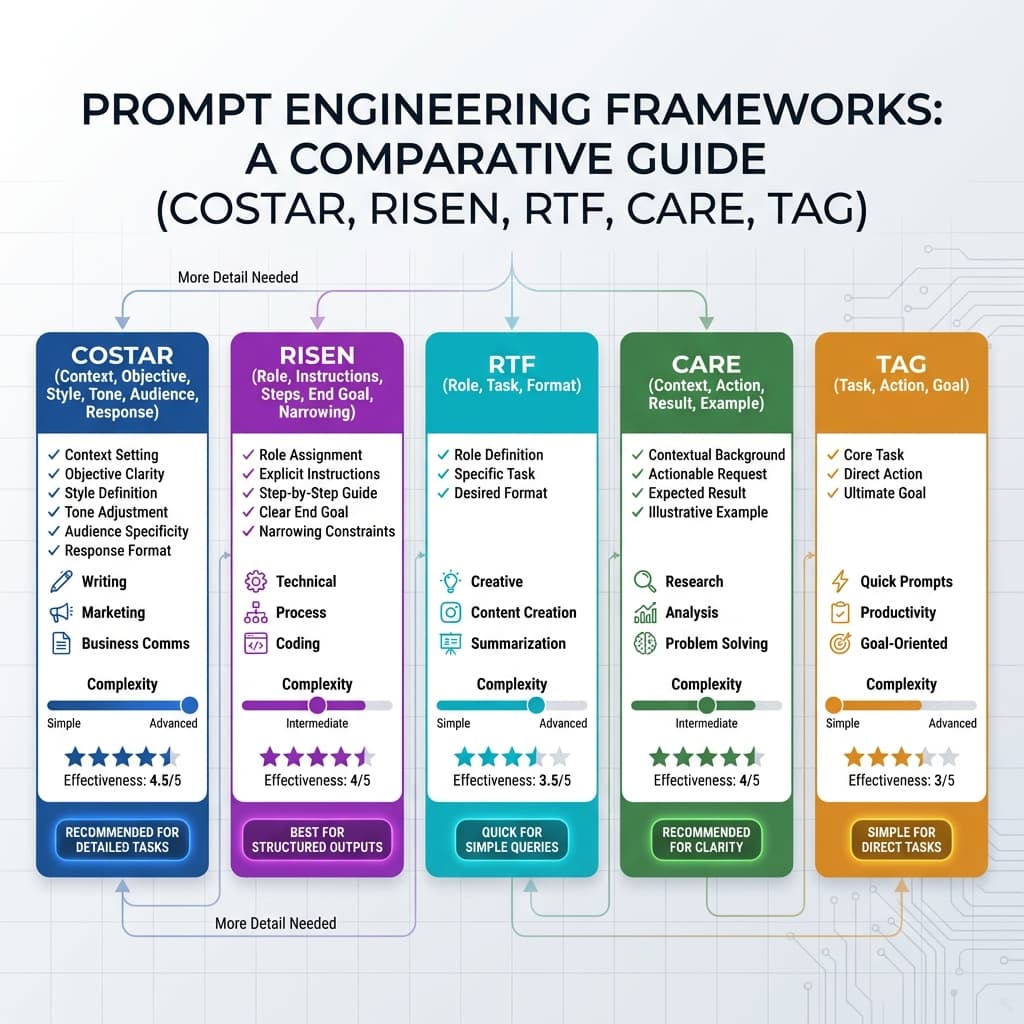
Prompt Frameworks Compared: Which One Should You Use? (COSTAR vs RISEN vs RTF vs CARE)
If you've spent any time learning about prompt engineering, you've probably encountered frameworks like COSTAR, RISEN, RTF, and CARE. They all promise to improve your AI outputs by providing structure to your prompts.
But here's the problem: Which one should you actually use?
The answer isn't "pick one and stick with it forever." Different frameworks excel at different tasks. Understanding when to use which framework is the key to mastering prompt engineering.
Let's break down the most popular frameworks, compare them side-by-side, and give you a decision framework for choosing the right one.
Why Frameworks Matter (Reduce Cognitive Load)
Before we dive into specific frameworks, let's address the fundamental question: Why use a framework at all?
The problem with freeform prompts:
- You forget important details
- Inconsistent results across similar tasks
- No systematic way to improve
- Hard to share best practices with teams
The benefit of frameworks:
- Reduce cognitive load: No need to remember what to include
- Ensure completeness: Frameworks prompt you to cover all bases
- Enable consistency: Same structure = similar quality
- Facilitate sharing: Team members can follow the same pattern
Think of frameworks like templates. You wouldn't write a business proposal from scratch every time—you'd use a template. Prompt frameworks are templates for AI instructions.
The 5 Most Popular Prompt Frameworks
1. COSTAR Framework
Stands for:
- Context: Background information
- Objective: What you want to achieve
- Style: Tone and voice
- Tone: Emotional quality
- Audience: Who it's for
- Response: Desired format
Complexity: ⭐⭐⭐⭐ (Advanced)
Best for:
- Content creation (blogs, articles, marketing copy)
- Business communications
- Detailed, nuanced outputs
- When audience and tone matter
Example:
Context: You are writing for a B2B SaaS company that sells project
management software to mid-sized tech companies.

Objective: Create a blog post that educates potential customers about
the benefits of agile project management and positions our software as
the ideal solution.

Style: Professional but approachable, using real-world examples and
avoiding jargon.

Tone: Helpful and authoritative, not salesy.

Audience: Project managers and team leads at tech companies with 20-100
employees who are considering switching from traditional project management
to agile methodologies.

Response: 1500-word blog post with:
- Engaging introduction
- 5 key benefits of agile (each 250 words)
- How our software supports each benefit
- Conclusion with call-to-action
- SEO-optimized with keyword "agile project management software"
Pros:
- Extremely comprehensive
- Great for nuanced, audience-specific content
- Forces you to think about all dimensions
Cons:
- Time-consuming to fill out
- Overkill for simple tasks
- Can feel repetitive (Style vs. Tone overlap)
2. RISEN Framework
Stands for:
- Role: Who the AI should be
- Instructions: Clear, specific directions
- Steps: Sequential actions
- End goal: Desired outcome
- Narrowing: Constraints and refinements
Complexity: ⭐⭐⭐⭐ (Advanced)
Best for:
- Technical documentation
- Process-oriented tasks
- Multi-step workflows
- Code generation
Example:
Role: You are an expert Python developer specializing in data validation.

Instructions: Create a function that validates user registration data.

Steps:
1. Accept three parameters: email, password, username
2. Validate email format using regex
3. Check password strength (min 8 chars, uppercase, lowercase, digit, special char)
4. Verify username length (3-20 chars, alphanumeric + underscores only)
5. Return a dictionary with "valid" boolean and "errors" list

End goal: Production-ready code with type hints, docstrings, and error handling.

Narrowing:
- Follow PEP 8 style guidelines
- Include 5 unit tests covering edge cases
- Handle None values and non-string inputs gracefully
- Return all errors at once, not just the first one
Pros:
- Excellent for step-by-step tasks
- Clear structure for complex processes
- Great for technical outputs
Cons:
- Not ideal for creative tasks
- Can be rigid
- Steps might not always be sequential
3. RTF Framework
Stands for:
- Role: Who the AI should be
- Task: What you want done
- Format: Desired output structure
Complexity: ⭐⭐ (Simple)
Best for:
- Quick tasks
- Simple queries
- When you need speed over nuance
- Content summarization
Example:
Role: You are a social media manager for a tech startup.

Task: Create 3 LinkedIn posts announcing our new feature: automated
invoice generation.

Format: Each post should be:
- 150-200 words
- Professional but enthusiastic tone
- Include one emoji
- End with a call-to-action
- Hashtags: #SaaS #Automation #SmallBusiness
Pros:
- Fast and simple
- Easy to remember
- Good for routine tasks
Cons:
- Lacks depth for complex tasks
- No guidance on audience or constraints
- Can produce generic outputs
4. CARE Framework
Stands for:
- Context: Background information
- Action: What you want the AI to do
- Result: Expected outcome
- Example: Sample of desired output
Complexity: ⭐⭐⭐ (Intermediate)
Best for:
- Creative writing
- When you have a specific style in mind
- Research and analysis
- Problem-solving tasks
Example:
Context: I'm writing a grant proposal for a research project on AI ethics.
The grant is from a foundation that values practical impact over theoretical
research.

Action: Help me write the "Expected Impact" section of the proposal.

Result: A compelling 300-word paragraph that explains how this research
will lead to concrete policy recommendations and industry best practices.

Example: Here's the tone I'm going for:
"This research will bridge the gap between academic AI ethics and real-world
implementation. Rather than adding to the theoretical literature, we will
produce actionable frameworks that companies can adopt immediately..."
Pros:
- Examples make expectations crystal clear
- Great for matching specific styles
- Flexible for various use cases
Cons:
- Requires you to provide good examples
- Can be time-consuming to craft examples
- Less structured than COSTAR or RISEN
5. TAG Framework
Stands for:
- Task: What needs to be done
- Action: How to do it
- Goal: Desired outcome
Complexity: ⭐ (Very Simple)
Best for:
- Absolute beginners
- Very simple tasks
- Quick iterations
- Goal-oriented prompts
Example:
Task: Summarize this 10-page research paper.

Action: Read the paper and extract the key findings, methodology, and
conclusions.

Goal: A 200-word summary suitable for a literature review, focusing on
findings and implications rather than methodology details.
Pros:
- Extremely simple
- Quick to use
- Good for beginners
Cons:
- Too basic for complex tasks
- No audience or tone guidance
- Can produce shallow outputs
Side-by-Side Comparison
| Framework | Complexity | Best Use Cases | Strengths | Weaknesses |
|---|---|---|---|---|
| COSTAR | ⭐⭐⭐⭐ | Content creation, marketing, business comms | Comprehensive, audience-focused | Time-consuming, overkill for simple tasks |
| RISEN | ⭐⭐⭐⭐ | Technical docs, code, multi-step processes | Step-by-step clarity, great for technical work | Rigid, not ideal for creative tasks |
| RTF | ⭐⭐ | Quick tasks, social media, summaries | Fast, simple, easy to remember | Lacks depth, can be generic |
| CARE | ⭐⭐⭐ | Creative writing, research, problem-solving | Examples clarify expectations, flexible | Requires good examples, less structured |
| TAG | ⭐ | Beginner tasks, simple queries | Very simple, quick | Too basic for complex work |
When to Use Which Framework
Use COSTAR when:
- ✅ Creating content for a specific audience
- ✅ Tone and style matter significantly
- ✅ You need nuanced, polished outputs
- ✅ Writing marketing copy, blog posts, or business communications
Example tasks:
- Blog post for technical audience
- Email campaign for product launch
- White paper for enterprise clients
- Landing page copy
Use RISEN when:
- ✅ You have a multi-step process
- ✅ Creating technical documentation
- ✅ Generating code
- ✅ Building tutorials or how-to guides
Example tasks:
- API documentation
- Code generation with tests
- Step-by-step tutorials
- Process documentation
Use RTF when:
- ✅ You need something quick
- ✅ The task is straightforward
- ✅ You're iterating rapidly
- ✅ Creating social media content or summaries
Example tasks:
- Social media posts
- Quick summaries
- Email drafts
- Simple content variations
Use CARE when:
- ✅ You have a specific style or example in mind
- ✅ Creative writing or storytelling
- ✅ Research analysis
- ✅ Problem-solving with context
Example tasks:
- Creative writing (matching a specific style)
- Research summaries
- Brainstorming sessions
- Analytical reports
Use TAG when:
- ✅ You're just starting with prompt engineering
- ✅ The task is very simple
- ✅ You want to iterate quickly
- ✅ Goal clarity is more important than process
Example tasks:
- Basic summaries
- Simple questions
- Quick drafts
- Learning exercises
Real-World Examples: Same Task, Different Frameworks
Let's see how different frameworks handle the same task: generating a product description for wireless earbuds.
COSTAR Approach
Context: You are writing for an e-commerce site selling premium audio products.

Objective: Create a compelling product description that drives conversions.

Style: Benefit-focused and descriptive, using sensory language.

Tone: Enthusiastic but not hyperbolic.

Audience: Fitness enthusiasts and commuters who value quality audio and
long battery life.

Response: 150-word product description with:
- Opening hook highlighting key benefit
- 4-6 feature bullets
- Closing statement with call-to-action
Result: Detailed, audience-specific, conversion-optimized
RISEN Approach
Role: You are a product copywriter for a premium audio brand.

Instructions: Write a product description for wireless earbuds.

Steps:
1. Open with the primary benefit (10-hour battery life)
2. Describe sound quality (bass, mids, highs)
3. Mention comfort and fit
4. Highlight sweat resistance for workouts
5. Include technical specs
6. Close with call-to-action

End goal: 150-word description that informs and persuades.

Narrowing: Focus on practical benefits, avoid technical jargon.
Result: Structured, informative, step-by-step clarity
RTF Approach
Role: Product copywriter for audio brand.

Task: Write a 150-word product description for wireless earbuds with
10-hour battery, great sound, and sweat resistance.

Format: Opening hook, 4-6 bullet points, closing CTA.
Result: Quick, functional, less nuanced
CARE Approach
Context: Writing product description for premium wireless earbuds targeting
fitness enthusiasts.

Action: Create a compelling 150-word description emphasizing battery life,
sound quality, and sweat resistance.

Result: Description that drives conversions by focusing on benefits over features.

Example tone: "Sleek, modern design meets powerful performance. These earbuds
don't just look good—they deliver crystal-clear audio that transforms your
workout..."
Result: Style-matched, example-driven, creative
Mixing and Matching: Hybrid Approaches
You don't have to stick to one framework. Experienced prompt engineers often mix elements:
Example: COSTAR + CARE Hybrid
Context: [COSTAR element]
Objective: [COSTAR element]
Audience: [COSTAR element]
Example: [CARE element - show desired style]
Response format: [COSTAR element]
This gives you COSTAR's comprehensiveness with CARE's style-matching power.
PromptBoost: Try All 18+ Frameworks
Here's the problem with frameworks: remembering them and applying them manually is tedious.
That's why PromptBoost includes 18+ built-in frameworks with guided templates:
- Choose your task type
- Select a framework (or let us recommend one)
- Fill in the guided prompts
- Get a structured, optimized prompt instantly
No memorization. No manual formatting. Just results.
Frameworks included:
- COSTAR, RISEN, RTF, CARE, TAG (covered here)
- And check remaining specialized frameworks
Try all of them and discover which works best for your specific needs.
Your Action Plan: Master Prompt Frameworks
-
Start with RTF or TAG (simplest frameworks)
- Use for 5-10 tasks to get comfortable with structured prompting
-
Graduate to CARE (intermediate)
- Practice providing examples
- Use for creative or style-specific tasks
-
Learn COSTAR and RISEN (advanced)
- Use COSTAR for audience-focused content
- Use RISEN for technical/process-oriented tasks
-
Experiment with hybrids
- Mix elements from different frameworks
- Find what works for your specific use cases
-
Build a framework library
- Save your best framework-based prompts
- Reuse and refine over time
Or skip the manual work and try PromptBoost—all frameworks built-in, ready to use.
The bottom line: There's no single "best" framework. The best framework is the one that fits your task, audience, and goals.
- Quick tasks? RTF or TAG
- Creative work? CARE
- Technical docs? RISEN
- Marketing content? COSTAR
Master multiple frameworks, and you'll have the right tool for every job.
Ready to try all the frameworks? Get PromptBoost and access 18+ frameworks instantly.
Ready to Transform Your Prompts?
PromptBoost has all these frameworks built-in. Start creating professional prompts in seconds.
Get PromptBoost Now